
Cablevision DNS Redirect Nonsense

Email this post Print this post
By Barry Ritholtz - September 28th, 2008, 8:30PM

Here’s the latest insanity from my internet provider, Optimum OnLine by Cable Vision: DNS Redirect.

I used to just punch in “WSJ” into Safari’s URL, hit enter, and off I
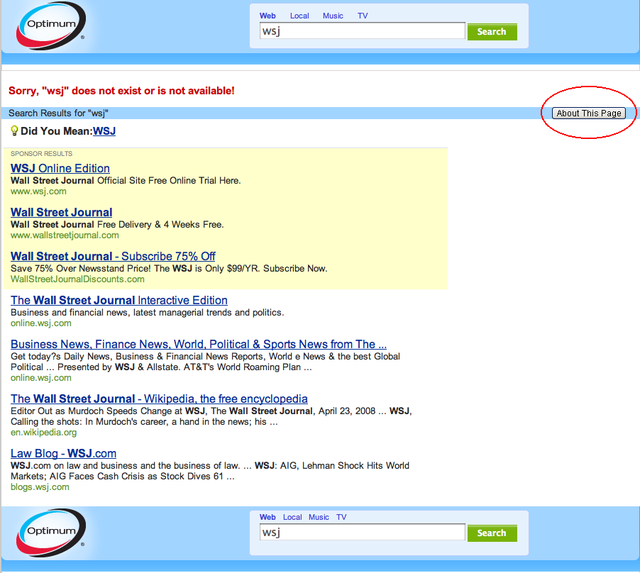
went. Any URL worked that way. Since last week, that now sends me to an ad-based Optimum page
(powered by Google). On the Windows machine in the office, I use “Control Enter” for the same effect.

Incensed, I called the help line and found out this was a system-wide change since 9/22/08. The woman also tells me I was the first person to complain, no one else has had a problem with it.

Apparently, the folks at Cablevision decided that they wanted to capture some of that sweet, sweet Google ad revenue. So on their own, they involuntarily switched all of their internet subscribers over. Not opt in mind you, but forced over. Any URL entered that does not immediately conform to the usual “HTTP” format sends you to an Optimum Online/Google page.

Note that this defeats a nice function that has been on Safari and Firefox for a while.

The company line is that this is a form of search assistance — gee, I guess I don’t want to go to the page I go to all the time, I want to first SEARCH for that page. Yes, Cablevision, that is a whole lot more helpful.

It shows you what even a a slight bit of monopoly power is so easily abused.

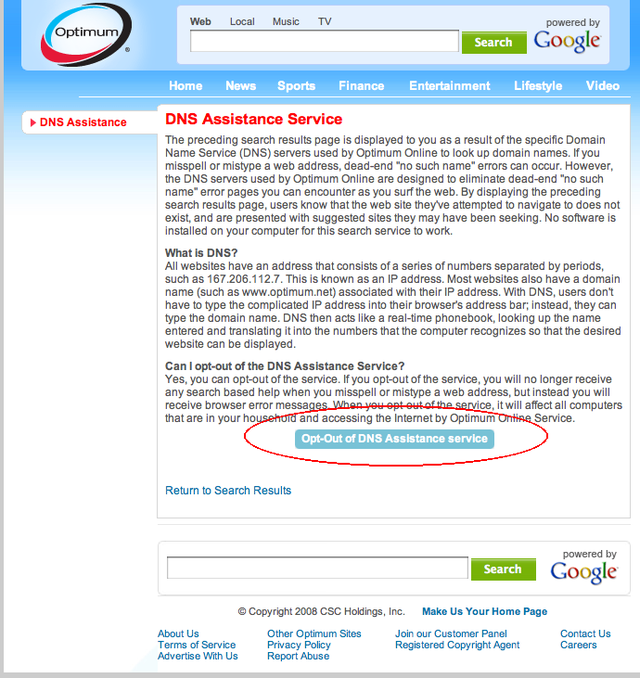
You can opt out via the “About this page” (see below)

>

>

New Optimum Search Results
(you need to click the About This Page to escape)
>
“About This Page” leads to an “About the Optimum Search Help” Pag
e
(click the Opt Out of DNS Assistance Service to escape)
Comments

Please use the comments to demonstrate your own ignorance, unfamiliarity with empirical data, ability to repeat discredited memes, and lack of respect for scientific knowledge. Also, be sure to create straw men and argue against things I have neither said nor even implied. Any irrelevancies you can mention will also be appreciated. Lastly, kindly forgo all civility in your discourse . . . you are, after all, anonymous.

37 Responses to “Cablevision DNS Redirect Nonsense”

  1. cfe Says:

    I can’t stand Cablevision.

  2. Steve Barry Says:

    I have Optimum Online, using IE7 with Google Toolbar and Browse By name turned on and don’t have this issue. I like Google Toolbar…just find it odd that version 5 has been beta for about a year, given the power of mighty Google. Glad I own QID.

  3. Jim Haygood Says:

    Optonline (which I’m typing this on now) sucks. It is slower than telco FIOS; at high-traffic periods, it can slow to a crawl. Of course, that can be a very local issue.

    There’s also cable-company “attitude,” as you experienced. They once detroyed some shrubs in our front yard, fixing their line. When my wife complained, they informed us that they have legal eminent domain to trample our property at will, and there isn’t jack sh*t we can do about it.

    Telcos and cable companies both suck. But it is likely, in the specific area of internet service (and possibly digital TV as well), that cable companies suck worse.

    What do others say?

  4. Dude Says:

    Oh, that should be easy to fix. Don’t use your ISP’s domain name server. Instead, use OpenDNS (Free!) You can define your own ‘shortcuts,’ but wsj as you describe works. OpenDNS is also much more secure.

    By the way, my only connection with OpenDNS is that I’m a user.

  5. Mark E Hoffer Says:

    BR,

    this is just another Front in the War on the ‘Cained Peep. These ‘ISPs’ think that, at the minimum, you’re in Their ‘walled garden’, at their behest, completely forgetting, convienently, that they were only able to Finance their Infrastructure build-out on the basis of the Public’s granting of Franchises/Rights-of-Way.
    see:
    http://www.eff.org/
    for starters, and this contrivance:
    http://homes.eff.org/~barlow/Declaration-Final.html
    for some additional flavor..

  6. Nematode Says:

    There’s a way around this without falling into OpenDNS’s own advertising traps. Use Level3′s public DNS servers:

    IP #s 4.2.2.1 to 4.2.2.6

  7. DJ Says:

    Try this service – http://www.opendns.com/homenetwork/solutions. It basically allows you to control the service that resolves the domain name requests from your browser. You can specify all the shortcuts you want. Works great with Verizon FIOS.

  8. DJ Says:

    Sorry – didn’t read all the posts prior to posting.

  9. Stav Says:

    Verizon DSL started doing this a few months ago. Very aggravating. However on Facebook I signed up as a friend of Oxfam and they took over from the Verizon browser. I’d like to get rid of it too, but at least the search pennies are going to Oxfam and not VZ.

  10. Kevin Keating Says:

    This happened to me last week, too, and I was furious! Managed to fix it on my own rather than calling in because it was late at night, but now I wish I had called – if only so you didn’t get the b.s. line “no one else has had a problem with it.”

    Lame, Optimum.

  11. sailorman Says:

    You can override the DNS servers and use any number of them that will not go to the site you mention.

    The DNS servers are given to your computer on the DHCP broadcast when you boot up. You can change your settings so that you can specify any DNS server you like instead of the ones in the DHCP broadcast.

  12. S Haust Says:

    Barry, Dell has been doing this for years and years. They’ve built it into their laptops. We have one that defaults to a Dell “search” page on the slightest difference from the “official” http format and sometimes on an entirely legitimate url.

    Along the same line, Dell for years had complaints about the pre-installed software on their machines that you just could not get rid of, which kept putting up “Buy Me Now” popups. Until a young fellow published a free program called the “Dell Decrapifier”. Talk about the Big Harrumph and corporate mentality in full retreat. How sweet it is!

    ~~~

    BR: Yah, I mentioned the decrapifier in 2006:
    http://bigpicture.typepad.com/comments/2006/04/linkfest_xxx.html

  13. tulsatime Says:

    Ain’t it great Barry? I got to where I bookmarked everything because I never knew what the change of the week would be from my friends at ATT. Nice to hear about the level 3 dns servers, thanks Nematode!

  14. debreuil Says:

    You should try Firefox ‘quick searches”. Firstly you can associate any bookmark with a keyword, so for example wsj.com could be just ‘wsj’, or google.com could be ‘g’ (type g in the address bar and hit enter).

    It gets better though, you can also add an input variable… so to go to google and search for bailout, you just type “g bailout”. Your bookmark in that case needs a ‘%s’ where the search term goes, so like:

    http://www.google.com/search?q=%s

    (do the search once, bookmark it, then replace the search term with ‘%s’ and add the ‘g’ as a shortcut.)

    google stock search:
    http://www.google.com/search?q=stocks:%s

    search for an electronic component on digikey:
    http://ca.digikey.com/scripts/dksearch/dksus.dll?KeyWordSearch?Keywords=%s&site=ca

    etc….

    It is awesome, and bypasses the kind of issue you have above (it will always be a well formed url that is sent).

  15. Brighthouse sucks Says:

    Brighthouse pulls this same crap. If I misspell a url by one letter they send me to their ugly ass search page and modify the url. I can’t just type over the one bad letter to go where I intended. Annoying little assholes are behind this. Doesn’t anyone care about doing what is right anymore? They don’t give a shit as long as they get a few extra bucks out of it.

  16. Eric Says:

    “In…ter…net, eh?” — Homer Simpson

  17. popo Says:

    You do know you can just do a SHIFT ENTER, instead of an ENTER and it will automaticall ad the www. and the .com?

  18. jasRas Says:

    You should choose your own DNS. By default you are subject to whoever the provider provides, but that may actually slow your internet experience down by bouncing you around too many times. My understanding is that services like OpenDNS can actually speed things up because they try and send you the most direct routing. That may be a bunch of bunk, but it was in one of my Mac magazines.

    Good luck.

  19. debreuil Says:

    You should use firefox quick bookmarks. I tried to post something earlier but too many link examples I assume : ). The long and short is you can associate words with a url, so ‘wsj’ would go to that site, and ‘g’ goes to google. You can also add a search term with %s (will be replaced by all text after the first word), so ‘g bailouts criminal’ would search google for criminal bailout information. ‘qt MSFT’ can be set up to give a quote on microsoft. etc. It is all done in bookmarks.

    It is very easy to set up, and very cool to use. The urls always macro out to full urls, so it bypasses the stupidity from your provider. (Typing just the non http part in your url will often actually ping a search engine first, so it is also quicker).

  20. Brian Says:

    Jim Haygood: Your comments are the most disturbing. Every single American reading his comments should be very scared. It’s completely shocking that a cable company could receive legal eminent domain from any court in the US over someone’s property rights….

  21. KnotRP Says:

    Tip of the iceberg….these kinds of ISPs pull another 90% that is below the surface, where you cannot see.

  22. Jojo Says:

    Ha, all these monopolies are the same.

    I had a problem with my AT&T/SBC/PacBell connection. In looking for a way to contact them, I came across a note on their support pages saying that effective Oct 1, they were eliminating e-mail as a means of contacting support! Only a telephone call or live chat options remain.

  23. Josh Ulrich Says:

    When this happened to me, I stopped using DNS all-together. I just type the IP address right into the address bar now.

    204.9.177.195

    ;-)

  24. mhigh Says:

    I noticed that the “did web page doesn’t exist” was being redirected to my cable company’s page a little while back, but didn’t really care since I so very rarely mistype a domain name or address. My company is Grande Communications – if I enter some nonsense term like dfdffsddd into the browser bar, it goes to Google search — but if I enter dfdffsddd.com, it brings up the Grande “Sorry, did you mean these Yahoo search terms?…” page instead. And I just checked that page, and there is an opt-out option.

    For me frankly, it’s such a minor concern, and I only run across it maybe once a month, and I don’t consider it intrusive or annoying at all. Different strokes, I guess.

  25. Jon H Says:

    Verizon DSL does the same, so I use OpenDNS.

    Mark E. Hoffer wrote: “Front in the War on the ‘Cained Peep”

    Speak human, please.

  26. BG3303 Says:

    I would agree that a little bit of monopoly causes a lot of bit of insanity. I’m in DC and the resident telecom monolith is Comcast. They recently “opted” into charging me wildly different and completely unjustifiable rates over a 3 month period and then forcing me to go through several hours of horse ish on their phone lines to have it worked out (aka making them give me back the $175 they attempted to steal from me).

    Looking forward to FIOS

    BG

  27. tyaresun Says:

    This is amazing. The mother of all bailouts is going on and the only things you guys can think of discussing is the cable connection.

    It it true that this is Barry blog and he can discuss whatever he pleases but I was hoping for an assist from one of my favorite blogs.

    ~~~

    BR: I’ve posted on this incessantly — until the final bill is voted on, there’s not a whole lot more to say on this

  28. Dr. Kenneth Noisewater Says:

    Let me also recommend Privoxy to block out unwanted popups and banner ads..

    http://www.privoxy.org

    BTW, when I still lived in NY and was scrounging for a tech job, I actually got propositioned by some company that was selling a product/service that would allow an ISP or other network provider (like, say, a wifi cafe) to force users to have a ‘frame’ ad appear with every webpage they hit, as well as intercept and replace banner ads with their own. Needless to say, I didn’t take the job, and ended up leaving NYC instead. Not a lot of good, solid, fulltime tech work in NYC anymore.. It’s all conslutting, boring suit-and-tie work or that sort of shady dealing I just described..

    Frankly, I see very little if any reason to have back-office IT in NYC, given rents, utilities, regs, cost of living, etc.. Glad I moved..

  29. Lee Says:

    Hey! It’s free market capitalism. Don’tcha love it? These problems don’t exist in North Korea.

  30. Mark E Hoffer Says:

    Posted by: Jon H | Sep 29, 2008 12:27:41 AM

    Jon,

    ‘Cained Peep= from American*/ AmeriCaine

    Caine, from Cocaine, popular Drug from our pharmacuetical-induced ‘Consumer’ Wally World. ‘Peep’ http://www.merriam-webster.com/dictionary/peeps Slang: People*.

  31. JohnT Says:

    Also, use Dan Kaminsky’s blog to test your ISP’s DNS server for security. DNS servers may have a gaping hole that allows a hacker anywhere in the world to substitute his table of IP addresses in place of the correct ones. Thus, when you click on your bank’s URL, your ISP’s DNS server unwittingly connects you to a phishing site in, oh let’s say Uzbekistan. It looks exactly like your real bank. It collects your userid and password. Then it tells you there is a temporary failure. Eventually, somebody loots your account.

    Kaminsky’s DNS tester is here http://www.doxpara.com/

    OpenDNS is at least patched so that it isn’t vulnerable to the DNS security hole.

    What with commercialism and thievery the internet is not a friendly world.

  32. Marc Says:

    OpenDNS is great – check it out. http://www.opendns.com

  33. randy Says:

    nationalize this shit. there is no conceivable way that they could screw it up more than cablevision does.

  34. Larry Says:

    Don’t worry, Google Chrome is coming soon to OSX (or so they say). I’m also waiting for the Linux version.

    The auto-completion based on your browsing history is pretty cool (and no ads).

  35. Mark Says:

    BR: Dude…what in the world do you expect from a company (CVC) that has a negative net worth of $5 BILLION…?

    http://finance.google.com/finance?q=cvc

  36. Chuck Says:

    To make the list of alternatives absolutely ridiculous:

    http://www.dnsserverlist.org/

    Note that this list also shows time-to-resolve. Picking the right one may speed up your page loads somewhat.

    I dropped using the Qwest DNS servers earlier this year after they were consistently hijacked and Qwest ignored my requests to please plug the security hole.

  37. Juan Carlos de Burbon Says:

    I ran an internal DNS server in my house on a Cablevision-supplied feed. For some reason, my queries to the root DNS servers don’t get answered.

    So, when they put this DNS change into effect, they also blocked local DNS servers from making queries. Now that is hostile.

    I haven’t called them out on this yet, but I assume they won’t have anything intelligent to say about it.

    Is anyone else having issues with internal DNS servers?

46 queries. 0.366 seconds.
