
Graphic Design Idea for Bailout Nation Book
I came up with a neat graphic design idea for the book, but I have no idea how to execute it well.
On the top of every page, there is room for a small graphic design. It is maybe 4 X 1 inches. Usually the book title goes there, but really, you probably already know the title of the book you are holding in your hands and reading.
I wanted to do something a bit funkier with that space.
My concept was for a 100-150 year long time line. Something between a glyph and a ligature. Each chapter would highlight the events on the timeline that are in that chapter. As the book progress, the prior items are light gray, while each new bailout is bolded.
In the beginning chapters, it would look kinda like this:
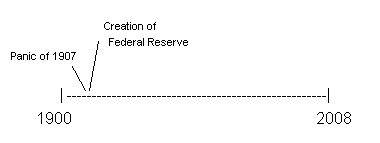
And towards the end it would look like this (I omitted all the stuff in between for simplicity’s sake) :
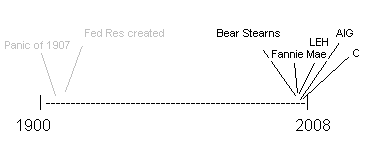
It can be either all typeface or a series of graphics.
There are about 25 events that would have to squeeze into the timeline. If you flipped all the pages it would look like a flip book history of bailouts.
If any reader wants to take a stab at doing it (or can shed some light on how), you will earn my undying gratitude, a credit in the author’s acknowledgment, plus a signed copy of the book (ready to be resold on eBay).
Any ideas?



December 2nd, 2008 at 7:55 pm
There is a similar problem experienced in the representation of geologic time since we have so much more data from recent rocks than we do from ancient rocks—the ‘events’ tend to clump at the end.
Check out this link from colleagues at the USGS and it might help a graphic artist get the gist?
http://pubs.usgs.gov/gip/geotime/time.html
regards,
burt
December 2nd, 2008 at 7:56 pm
This is a job for a graphic designer who likes doing free work. I’d suggest sending the assignment to your favorite art schools, i.e. Pratt, Tyler @ Temple U., University of the Arts in Philly, etc. Have a class doing a project with the winner getting to be in the book. It’s a win-win proposition. An artist gets something for the portfolio. You get free work.
December 2nd, 2008 at 8:01 pm
As an addendum to the above post: consider a simple spiral in 2D with segments of equal width. In 2d it would look like an ammonite in cross section. http://en.wikipedia.org/wiki/Image:AmmoniteFossil.JPG
Good Luck
December 2nd, 2008 at 8:11 pm
Barry,
I do graphic design, tell me more specifically what you want and exactly how many designs. From there we can talk about a “trade”. The “trade” being research or/and ad space for designs. Send me an email.
The idea from -mdcphilly- is good also. I have done it with a few projects but it takes more time than its worth unless the project is large.
December 2nd, 2008 at 8:35 pm
My advice; buy this book: The Visual Display of Quantitative Information, 2nd edition (Hardcover), or at least hire a designer who’s familiar with the principles outlined by Tufte.
http://www.amazon.com/Visual-Display-Quantitative-Information-2nd/dp/0961392142/ref=pd_bbs_sr_1?ie=UTF8&s=books&qid=1228267925&sr=8-1
December 2nd, 2008 at 8:36 pm
I’d leave it simple. It’s the content that will cause folks to buy your book. I wouldn’t get cute and put graphics where a chapter title would do. When there’s too much business on the page, it detracts from the content, it does not sufficient. If you want to do a time line, make an illustration and tie it to the text.
December 2nd, 2008 at 8:37 pm
Would it be cool to use either the top or bottom corner of each facing page for an animation of some sort? The type you see if you flick through pages with your thumb. Suitable only for soft cover.
Uncle Sam jumping out of a Manhatten tower?
December 2nd, 2008 at 9:00 pm
Barry, I know you want to do something original, but my best recommendation is to keep it simple on the header…
What about a fold-out with a time-line. It could be stationed in the middle of the book.
The book will be a success no matter what… And, honestly, the header at the top of this new blog makes me dizzy.
December 2nd, 2008 at 9:31 pm
Barry I don’t know if you can get a print copy of the Chicago Tribune…
but they do something like this and it’s a fairly recent addition from what I understand
since I heard about it from a friend who publishes another area paper there.
Across the page header there is a band of icons that show section or page left to right.
The icon for the current page is black and the others are grayed out and it says something like
‘you are here’
Can’t remember it exactly but I saw it when I was there a week or so ago.
Maybe you could get some ideas from that if you can get your hands on a copy
I’d think some newstand in NYC must have a copy.
Or just have someone in Chicago take a pic on their phone and email it.
December 2nd, 2008 at 9:56 pm
I’m no designer, but I mostly agree with Karen. I think it would be too busy to have it on every page. As you held the book open reading it there would be two of them staring at you all the way through the book. I suggest one at the beginning of each chapter to tell the reader where they are on the timeline. They don’t need to be reminded on every page, unless it changes intrachapter.
December 2nd, 2008 at 9:58 pm
karen,
good gravy~ commas make me dizzy, the header of the new page lay-out makes me dizzy, pray tell, what doesn’t make you dizzy? : )
past that, many of the ideas, above, are good ones.
Tufte, per my friend that was doing graphics at the NYT, is the pied-piper of the Profession..
The ‘time-spiral’ presentation, on a full(-er) page could be pretty cool, nothing like cross-stitching from other disciplines..
December 2nd, 2008 at 10:00 pm
BR,
When I saw this post I was thinking along the line of the horse rotoscope. I can’t find the machine doing that horse sequence but the following links help.
http://en.wikipedia.org/wiki/Flip_book
http://www.privatelessons.net/2d/sample/m01_04.html
http://en.wikipedia.org/wiki/Animation
As far as the job goes … how many different time periods do you want to represent across … a 6″ wide page? Color is probably out … shades of gray?
December 2nd, 2008 at 10:10 pm
As a chapter heading, I think it’s a great idea. As a page heading, I would emphasize simplicity of design, perhaps just using a timeline for the bailout at hand. If you want to play around with different looks, I can recommend Bee Designs’ Timeline.
http://www.beedocuments.com/index.php
December 2nd, 2008 at 10:15 pm
Barry,
You could try the “cool” Mac software from here: http://www.beedocuments.com/index.php
Doug
December 2nd, 2008 at 10:18 pm
This is a job for a professional. Pull some cash out of your pocket and pay for it.
Do you have a publisher?
They have them on staff as do many marketing departments for any company that is going to win any business.
So ask around, you have contacts.
I hope.
Jack
December 2nd, 2008 at 10:23 pm
Another thought, You are in NYC with the world going to hell. There are probably graphic designers standing on the street corners with a signs “will work for food and art supplies”
Jack
December 2nd, 2008 at 10:53 pm
It has to be very simple or it will look too busy – after all you want the reader’s eyes on your text and not on the header. Clearly, you cannot use text, it will have to be symbols of some sort. And it cannot be one symbol per bailout, or you’ll have a thousand of them – you’ll have to indicate them in batches. Perhaps symbolizing something important about each batch of bailouts…causes, or important institutions created. Perhaps an indication of how much the taxpayer owns of the economy at a given point in history.
Dunno, I’d leave it off unless you come up with killer idea. Try the books someone mentioned by Edward R. Tufte. he’s the master.
And don’t go looking for designers on corners, they are extremely busy this time of the year unless they’re no good. You need a pro.
December 2nd, 2008 at 11:20 pm
Mark, oh my; i’ve let my guard down, and, carelessly, marked myself as a dizzy girl. I have refrained from commenting on Barry’s design in the past, and decided, since pressed, that i would inject my aesthetics, which arise from minimalism.
Anyway, i love a pop-up book: and a fold-out could be just as fun.
BTW, my genius, 21 year old, doesn’t come to the new TBP as often as he did to the old, and, is still complaining about the layout.
ps. i almost had comma eurphoria but refrained. <3
December 2nd, 2008 at 11:23 pm
I vote to omit it. Good in theory. But really a bell/whistle. Save it for book two. Time’s better spent looking for typos.
December 2nd, 2008 at 11:28 pm
As to the website – the header is downright toxic. It takes up 55% of the screen on a 1024×768 display. Just a really sloppy design. Great content on the site – but whoever did the header was either (1) swinging for the fences and whiffed (2) being demanded to do what they should have advised against or (3) an amateur.
As for the book – if you want this done, you should offer something more reasonable for it. Merely crediting someone in a book and giving them a free copy is a slap in the face for the amount of time that is necessary to do this type of thing (especially when viewed in regards to the amount of money you may see coming into your account off the sale of such an interesting book concept). Do you tell the doctor you will give him a free book and credit if he gives you a physical? Does a lawyer get a free book and credit for legal services?
This kind of request is typically met with grave consternation in the graphic design community but you should be able to find someone who is ripe for exploitation.
~~~
BR: As noted before, the header is being tweaked in January
December 2nd, 2008 at 11:29 pm
(And if it were up to me – I’d also vote to omit it as being a great idea in concept but not in practice given the circumstances)
December 2nd, 2008 at 11:32 pm
TrickStar, you are so right! I found typos in Soros’s book… not acceptable, but forgivable.
December 2nd, 2008 at 11:32 pm
Not on every page. Niet. Non. Nee. Nein. Too much.
Every Chapters is fine.
Get the Gimp (www.gimp.org). Install it.
Experiment. Learn.
Do it yourself.
Be proud of what you have done.
Become something you’re not.
December 3rd, 2008 at 7:51 am
Here’s a clump of ideas. You will still have to work them out, but I think there’s some gold in there.
1) Staggered titles, similar to staggered totals in a computer report that has numbers that are too long to all print on one line
2) Don’t try to put it all on one line. Break the time line into logical units and provide more detail on each time line. Finish with one comprehensive time line that onlt includes the main points from the detail time lines. Maybe include a little of the before and after so that you illustrate continuity … I strongly doubt all crashes stand alone. Threads from each follow through into the subsequent one(s). There is no such thing as ‘original stupidity’. A really good ‘bad idea’ never completely goes away.
3) Experiment with vertical time lines. Then you have the page length to work with if you can figure out how to do it.
4) Use the three dots to jump over points nonessential to the current topic.
5) Remember, people will buy into anything you do if it is easy to read and understand. Invent a new concept. I do it all the time. It’s not that hard. As a famous explorer once said ‘Change The Rules’.
December 3rd, 2008 at 7:54 am
Love the glyph idea. Less sure about the flipbook, but if the glyph is unobtrusive enough it would be fine (perhaps without text?) A flipbook is sure to guarantee that every owner of the book has a dog-eared copy!
Animated timeline / sparkline:
y-axis could give some other information (stock index number?) Don’t think size of blip could represent $ amount of bailout (unless you go log?) I’m assuming there will be scaling issues for “the year of the bailout” that could be indicated in a more obvious way (other than text as I had there).
Just curious — why is LEH on your bailout chart? They’re dead because they didn’t get a bailout, right?
December 3rd, 2008 at 7:57 am
Ok, image link didn’t work. Here’s another try:
http://i35.tinypic.com/214uyvm.jpg
December 3rd, 2008 at 10:57 am
Here’s something quick & rough, to see if it’s up your alley:
http://www.tjctv.com/Uploads/ritholtz/
December 3rd, 2008 at 12:30 pm
Barry,
I like the idea.
Unfortunately, you will have trouble putting all the text over the top of the date line. You could put only the date for each bailout. That would let you fit them all in pretty neatly as you could stagger the dates on two or three lines with a vertical line going down to the timeline. You could have a page at the beginning and the end that enumerates each of the bailouts using text descriptions for those that want the complete picture.
Likewise, each chapter would have full text descriptions for the bailouts of that chapter.
The method would allow a reader to quickly find the chapters corresponding with a particular date by flipping through the book as the text descriptions would move progressively closer and closer to the desired date as the pages moved closer to the chapter.
- Curtis
December 3rd, 2008 at 2:21 pm
BR
Would do it for free – no acknowledgement necessary. I appreciate your blog and value your time. If you do it (not needed in a book), then make it easy. Example:
http://piehllc.blogspot.com/
Simple and fits easily into a 4 x 1 in text box. Options include lists by decade, using the magnifier over the event, showing each event relationally with size of bailout, adding a “+” or “-” and amount for positive contribution to government or negative contribution to government (taxpayers). No real end to what is possible – kind of up to you.
December 3rd, 2008 at 2:38 pm
Barry–
Love your site. I was a book designer about a dozen years ago. You should check with your editor. They can contact the designer or the art director who can design it so it meshes with the book’s layout. The tricky part will be laying out the text in a time period (like now) where there is a lot of activity.
Yogert909: “And don’t go looking for designers on corners, they are extremely busy this time of the year unless they’re no good. You need a pro.” Dude—there are plenty of good “pro” designers looking for work right now, just as there are plenty of employed “hacks” whose companies haven’t laid off people.
December 3rd, 2008 at 5:41 pm
Okay, to get this vision out of my head (that I managed to forget until the repost, grrrr) I sketched it out. Lensed timeline of bailouts. If you use a data lens (faked here) it doesn’t matter how dense or sparse the data are at any given spot, you just adjust the distortion. [Warning, this is a pretty rough graphic.]
December 3rd, 2008 at 10:18 pm
You may want to consider that if you specify anything but solid black, a screen of the black will be printed to fool your eyes into perceiving that the black is no longer black but some strength of gray. Screening small areas, or screening type of 8pt or less is not recommended and you may not be happy with the results. I know that there’s a very talented design and production staff at McGraw who would be happy to review a few examples of the timelines you are considering and offer some guidance before you get too deep. An alternative would be to stick with solid type and consider using a common timeline throughout the book that includes all 26 bits of information. You can relate the chapter you’re within to the timeline via the use of a “you are here” arrow which is the only thing that moves from chapter to chapter.
December 5th, 2008 at 9:34 pm
Use multiple lines…. one to represent each decade perhaps.
If needed use a call out { for active periods.