
More Cablevision Redirect Nonsense
In September, I mentioned that my internet provider, Optimum OnLine by Cable Vision, was hijacking my typos and searches via their DNS Redirect.
The company line is that this is a form of search assistance — but that’s transparent bullshit. I didn’t ask for search, and I know how to use Google. Besides, this defeats the auto search/find/connect function built into Firefox.
This system-wide change was implemented on 9/22/08. You have to physically opt out by selecting a few menus on that page (see below). That was 4 months ago.
This morning, I had the same problem. So I opted out again.
Thanis evening, the DNS redirect was back.
Apparently, there is no permanent opt out. There isn’t even a temporary opt out — the best you can hope for is a “momentary opt out.”
Just goes to show you: Even a slight bit of monopoly power is so easily abused by these clowns.
Optimum OnLine is trying to do to the internet what the Dolans have already done to the NY Knicks.
~~~
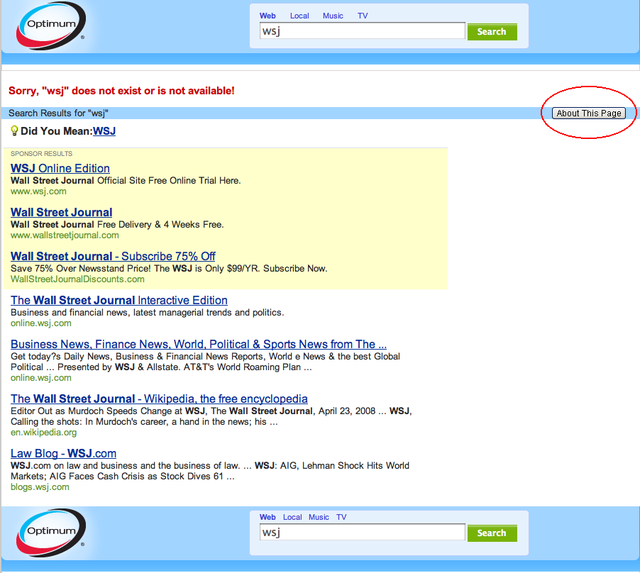
You can try to opt out via the “About this page” (see below)
>>
>
New Optimum Search Results
(you need to click the About This Page to escape)
>
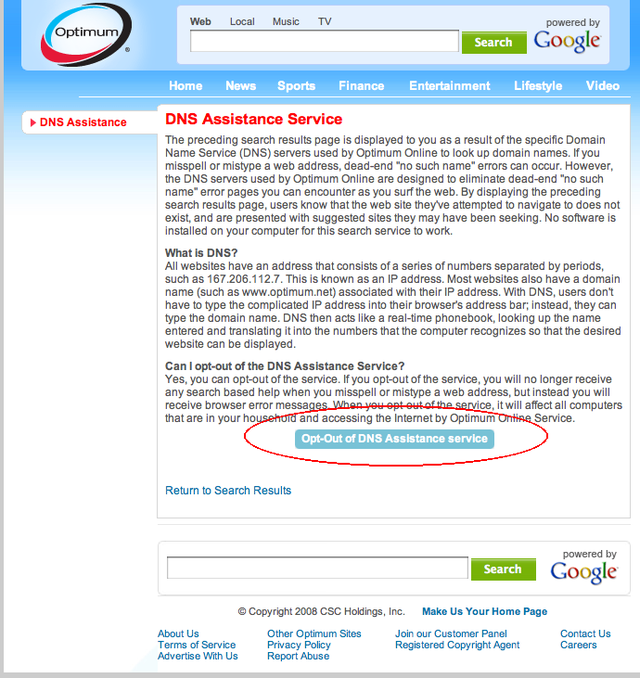
“About This Page” leads to an “About the Optimum Search Help” Page
(click the Opt Out of DNS Assistance Service to escape)


Tweet
Facebook
Reddit
Digg this!


January 17th, 2009 at 9:59 pm
Barry, you can just use other non-Optimum DNS servers and avoid this altogether. That way, they also cannot track what sites you visit because they then know nothing about them — another advantage.
Some good ones to use are here:
Here’s a huge list.
I use OpenDNS myself, but they are becoming too commercial.
I do everything I can in my own little way to subvert these clowns, and changing my DNS servers is one of those small things.
You probably already know this, but I can tell you how to change your DNS servers in Windows (any version) and any Unix/Linux, and can probably muddle through in Mac OS, too.
January 17th, 2009 at 10:21 pm
Mac directly connected to the cable modem: open system preferences, then click the Network icon. Next, click the Advanced button. Next, click the DNS tab. Add your DNS addresses by clicking the + button, and typing in the address. Click OK button. Click Apply button. Thumb nose at cable company.
Airport: start the Airport Utility. Click the Manual Setup button after selecting the Airport you wish to set up. Next, click the Internet icon at the top. Enter your DNS server addresses in the text fields on that screen. Click the Update button. Mutter “@*#^!&$ cable company” under your breath, or out loud if young children aren’t around.
January 17th, 2009 at 10:52 pm
Isn’t that irritating. The same thing with Charter Cable. As others have said one needs to bypass their DNS servers. Some that I use are 4.2.2.2 and 4.2.2.1
My understanding is some ISPs are also throttling bandwidth when one uses P2P protocols, VoIP protocols (because they want you to buy their way overpriced VoIP from them) and I’m wondering if some of them are even blocking streaming video.
Talk about a service which needs either serious regulation or some sort of consumer choice.
January 17th, 2009 at 10:54 pm
Just switch to verizon FiOs. Its fantastic.
January 17th, 2009 at 11:14 pm
This is the wave of the future. I noticed Versign tried this some years back, but backed down. Now OpenDNS is doing it, but at least they provide some anti-spoofing protection. DNS wasn’t very well designed in terms of security, and I was planning to opt-in to their service when my ISP got hacked and opted us all in for the time being.
This type of hijacking should be easy to fix. Surely Firefox can just catch references to a search page like this and turn them into Name Not Found errors. Isn’t that what Greasemonkey is for? In fact, this should be a standard browser option in all browsers. I’d mind less if they let you set the search engine to the one of your choice.
January 18th, 2009 at 1:08 am
quoderat:
I don’t get it. What is the purpose of the DNS stuff? Is it like going through a 2nd(or is it 3rd) party to view websites?
January 18th, 2009 at 3:20 am
+1 for Open DNS. Their servers also sometimes faster than the ISPs DNS servers which can have a dramatic effect on the perceived speed of your connection.
-S
January 18th, 2009 at 3:48 am
Calvin: the DNS it the equivalent of a white pages look up. It takes the URL and converts it to an ip address. Unfortunately, most ISP providers use it as a means to track your movements through the internet. They also try and force you to visit their preferred sites.
January 18th, 2009 at 5:40 am
This might fix the Firefox redirect:
“Type about:config in the address bar and press enter. If you are on Firefox 3, click “I’ll be careful, I promise!”. Now type keyword.url in the Filter field and set the value as:
http://www.google.com/search?q=
If you want Firefox to do a “I am Feeling Lucky” style Google search, use this value for keyword.URL:
http://www.google.com/search?btnI=I%27m+Feeling+Lucky&q=
Also make sure that the value of keyword.enabled is set to TRUE. That’s it – now any query you type in the Firefox Address bar will go to Google”
January 18th, 2009 at 5:58 am
the smarty value of some of the pants on this site is great Barry
January 18th, 2009 at 9:46 am
Barry, do you clear cookies on the PC? Cablevision may store the opt-out status in a cookie.
January 18th, 2009 at 10:26 am
Also, if you’re really paranoid about any service caching your DNS lookups, you _could_ run a DNS server on Mac OS X.. The standard (BIND 9) will compile and run if you install the OS X Developer Tools (from the install DVD).. At that point, you’d be querying root servers directly, and even though root server owners/registrars could play games, that’s about as “pure” a connection as you can get.
January 18th, 2009 at 10:29 am
Time Warner does this too, and it completely foobars up the Apple local network services. We installed our own DNS server as a defensive measure, but I expect most households don’t have the wherewithal to do that.
“That way, they also cannot track what sites you visit because they then know nothing about them — another advantage. ”
They can track you just fine. Your DNS request still goes over their wire, even if it isn’t answered by their server.
January 18th, 2009 at 1:41 pm
“Just goes to show you: Even a slight bit of monopoly power is so easily abused by these clowns.”
And that’s all you need to know about the federal monopoly on the money-printing presses…
January 18th, 2009 at 2:04 pm
“They can track you just fine. Your DNS request still goes over their wire, even if it isn’t answered by their server.”
You’re right, to an extent. However, most ISPs do not do this (YMMV), and it’s a hell of a lot easier to track you if you do bounce off their DNS. If not, it takes some special effort, is a lot more intensive bandwidth- and resource-wise to monitor. Not using their DNS is a small protection, but it is some protection.
If you really want to be protected, encrypted anonymous proxies are the way to go. Telling anyone how to do that, though, is well beyond the scope of this site.
January 18th, 2009 at 2:09 pm
The above encryption, and proxies, can avoid deep packet inspection that some ISPs do.
I’m not the paranoid sort, for the most part, so I don’t do any of this — but it is available, and fairly easy to set up.
January 18th, 2009 at 2:43 pm
Hi Barry,
This process varies depending on your laptop OS – but i you are using Windows Vista Home and a wireless laptop connection, to change your DNS provider, click the following links one by one:
start, control panel, network and sharing center, the “view status” link to the right of “wireless network connection”, properties, then highlight and click “internet protocol version 4″, then click the radio button next to “Use the following DNS server addresses” and enter at least one DNS server address.
I use a local university DNS server that is still available to the public, or you can use one of the servers the others mentioned.
January 19th, 2009 at 10:48 am
I have monmouth cablevision and hadn’t been hijacked but I went to open DNS through my router and it was easy. Haven’t noticed any perfomance improvement, I use Firefox with Safari as my backup.
Cablevision is so obnoxious, I stopped to pay my bill with the same credit card I’ve used dozens of times with them and they demanded photo ID which is not permitted by the Visa contract, I paid online with the CC – no problem!
We need other broadband alternatives to cable and VZ/ATT, there is no real price competition