Ask, and Ye Shall Receive:
The single biggest request I get about the site has been for an improved mobile version of TBP. Previously, I was using a simple Word Press plugin for mobile, and it was pretty weak.
It took some time and work, but the new and vastly improved version of the Mobile site is now live — and its pretty fantastic. Mad props to the team at Onswipe, they did an awesome job.
This version went live over the weekend — we are still in beta testing, so expect bugs and glitches to keep popping up in this version. (If you find any, please use the comments to tell me, and I will forward to the developers).
If you go to Ritholtz.com on any mobile device, you should see it (but some devices and settings don’t). If you want to see what it looks like, point any mobile browser to:
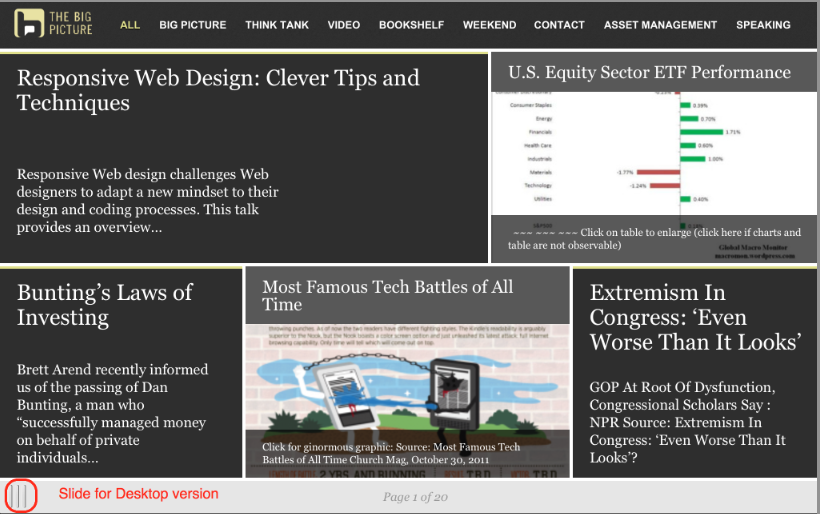
I’ll post the graphics after the jump.
Its mostly self explanatory, but let me mention a few hidden items:
• Both phones & tablets work similarly — they each have portrait and landscape orientations, but on phones the swipe is up and down in portrait mode.
• On tablets, the menu is laid out across the top; on phones, the pull down menu is top right;
• To find the button for the desktop version, grab the slide, swipe it to the right, and there is that button;
• Bug Alert: Once you go desktop, I don’t know how to revert back to the mobile version. The workaround is to use the mobile address.
I’m pretty jazzed at the way it came out– looking forward to your comments . . .
Phone version
Category: Technology, Weblogs
Please use the comments to demonstrate your own ignorance, unfamiliarity with empirical data and lack of respect for scientific knowledge. Be sure to create straw men and argue against things I have neither said nor implied. If you could repeat previously discredited memes or steer the conversation into irrelevant, off topic discussions, it would be appreciated. Lastly, kindly forgo all civility in your discourse . . . you are, after all, anonymous.


Damn, but you’re good … the new mobile site layout has won me over, after an initial distrust of “new things” (a.k.a., “change for the sake of change”), I find myself encountering a MUCH wider swath of the content (which unfortunately means that I am going to be spending more of my life here, perhaps I will have to reassess other things that I read/watch, despite my spending altogether too much time here already), your site has a Great Many Tentacles and is pretty complex, so much so that I do not spend the time to exhaustively traverse it multiple times per day.
The new layout exposes me to more of the site, in a pleasant and easy manner, and thus draws me deeper into it. I am missing less stuff.
My only suggestions at this point are as follow:
1) reduce your effort and maintain only a single version of the site, with the desktop using the same layout as the mobile. Yeah, I’m sure it will raise a firestorm of criticism, but you are surely up to dealing with that. Perhaps a few weekend reversions to a one-layout-to-rule-them-all motif would ease the shock (and awe) among the Readers.
2) If you go this route, you will need to do something about maintaining image clarity across a wider range of screen sizes. This is a problem that is at the bleeding edge of the web world, here are a couple of links to introduce you to the situation at present (I think, although I might be behind the curve here, it is not on my plate daily):
I think that the web needs mechanisms to accommodate a wide range of bandwidths and end node display sizes, providing feedback to the html coding as to what the situation is … this is something that cannot really adequately exist today, as the logical point of origin for that information is the browser, and it needs interfaces to the local router for bandwidth info, which in turn needs to be a bit smarter … anyhow, it’s obvious that the technology is Not Quite Ready, but ought to be here any day now … so be prepared.
In the meantime, I’m running my 27″ iMac with Safari masquerading as an iPad … but am also spending more time away from my keyboard, via my iPad/iPhone … it’s not a perfect solution (I plan on experimenting with Chrome and Firefox later today), but my direction is set.
Keep up the Good Work, with the best blog on the web … in any subject area.
Barry,
I am most unhappy with the new mobile version.
First issue: The new site does not allow you to pinch/stretch the view. I often want to make the page bigger, especially for charts.
Second issue: the hyperlinks in pale yellow/gold are really hard to see and read. Please fix.
Third issue: The author doesn’t show on the main page; you have to open an article to see who wrote it. It also doesn’t show source tabs or keywords. All articles are not the same either in author, length, or topic, and I’d like some clue without having to click through to find out.
Also, the ‘contact’ tab sends me to a “how to read this blog” type page, but no email address. Perhaps that is your intention, or maybe it’s on one of the yellow hyperlinks I can’t read, but I couldn’t find it.
At the least, can you provide a button to select going back to the non-mobile version? This mobile version doesn’t work for me.
Thanks,
Kellie
Mobile version rocks
Hello: I cannot access mobile site with my Galaxy 2, no matter what I click. Is this one of the devic es where there is a problem?
~~~
BR: What happens if you go to http://t.ritholtz.com/bigpicture/
Love it, it’s so much better than the mobile plugin.
You get an “A”.
It’s ok. I can do without tho. I like the desktop version and use it on my phone which has 960 x 540 resolution. The tablet version looks interesting but I second Kellie’s issues. These are big improvements over the old mobile version which kinda sucked. Please do not change the main site towards this model. Ugh.
Please do not drop the current version. The text is much better than the graphics of the new mobile version, and scrolling the home page up and down is quick and visually “continuous” — something that the new version is not. On my iPad Mini, at least, scrolling left to right brings on a new assortment of 5 articles, and there is no continuity of the image from page to page. My eyes/bring welcomes the continuity, I guess?
Plus on the iPad Mini, the screen is big enough for the current text-heavy version to show quite a bit of readable material, which is probably not true on the smaller screens on phones.
As you said, there is no way to revert back to the Mobile version, just to confirm.
Anyway, please do not do away with the current version.
PS — OT and BTW, the new iPad Mini is perfect for my needs, including use in the car. And with a Bluetooth remote keyboard, typing long emails, comments, etc. is still easy. Even the keyboard on the screen is almost usable as-is for these fat fingers!
Lastly thanks as always for a great site!
PS — By “current version” I am referring to the desktop home page, not the mobile plug-in.
The next version of the desktop will be a little cleaner and lighter — distinct from the mobile version.
Its a big improvement from the current desktop.
Hi again:
I commented last night that I could not access the mobile site by clicking on the link you provided. Still no luck with clicking on the link (I can see it insert the correct URL after I click, but then after a few seconds that “t” URL is replaced with the desktop URL). I have also tried typing in the new URL manually…and once again, after a few seconds of “thinking about it”, it goes “nah, we’re taking you back to the command capsule (ha!)
By the way, have been reading your site for just a month now after hearing about from a Canadian money manager who says it is one of her top 3 “must read” sites each a.m. Keep up the fantastic work !
My initial reaction is very positive. This is a huge step up from the old mobile version. I like the swipe functionality and it looks great. Looking forward to the new desktop now.
My main gripe is that each swipe on my iPhone causes a “stacking” of the prior page. So, you swipe to the next one, and you are two deep, swipe back and you are three deep, etc. Aside from the “waste” of stack space on the device (it gets very deep very quickly), it makes usage of the “back arrow” at the bottom of the display confusing at best.
The other “minor” nit is that in portrait mode, stuff slops off the right and left. Not a lot, just enough to be annoying. Conversely, in landscape mode, the display area is so tiny because of the space taken up by the header.
The best part is that those stupid pop-up ads are gone!
The mobile app does NOT work on my gen 4 I Pod touch.
I liked it so much when I logged on this morning that I got scared you’re going to go to subscription.
You’re not, are you???
I have a new toy – a cellSized androidPad* :-) Net10 still wants an extra $35/mo. to be all in1 – I attempted a surf @theBar via WiFi – goes into the standard page view – which I don’t mind with mediumZoom pages turned on – but the ad every page turn YUCK
I’m generally happy with MYpages but I see I have some standardization issues of my own :-|
* 4.25″diag w/Polaroid stamp (forgot our logos are similar)